
👋 Ready to Set Up Your Chatbot?
You’re in the right place — your live session starts here.
🕒 Come back to this page at your scheduled time for your live setup session.
A real agent will guide you step by step and help you get your chatbot up and running — fast and easy.
📩 We've also sent you an email with all the details.
If you don’t see it, please check your spam or promotions folder.
❌ Don’t have an appointment yet?
👉 Book one here
What You’ll Need to Have Ready
✅ Access to your Google Account (for Sheets integration)
✅ A working Google Sheet to collect leads (don’t worry — instructions below)
✅ Login credentials to your website to install the chatbot
✅ Around 15 minutes of focused time
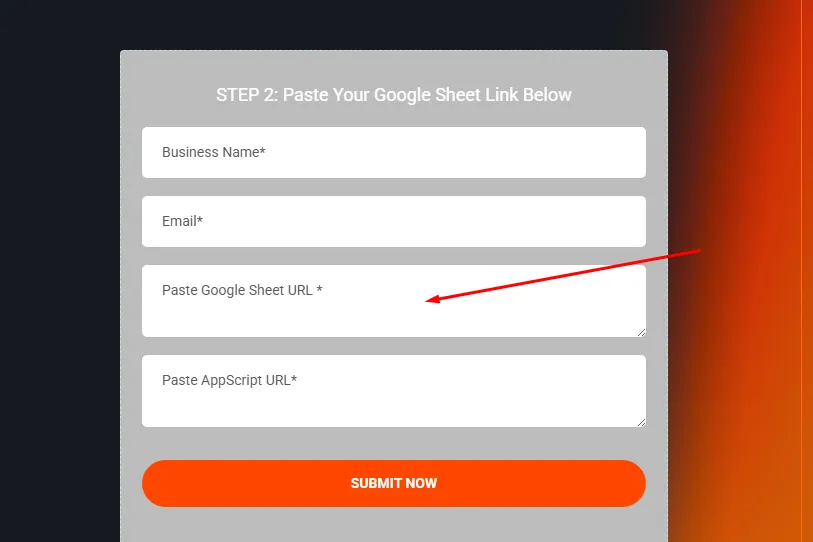
STEP 2: Paste Your Google Sheet Link Below

Don’t know how to create a Google Sheet?
Watch the video below or follow this quick step-by-step guide:
✅ How to Create Your Google Sheet:
To activate your chatbot, we need the link to your Google Sheet titled “Chat Leads List.”
Go to Google Sheets
2️⃣ Click + Blank to create a new sheet
3️⃣ At the top left, rename it to: Chat Leads List
4️⃣ Google will autosave your changes
5️⃣ Copy the URL from the browser address bar (e.g.,
https://docs.google.com/spreadsheets/d/...)
6️⃣ Paste the link to into the third box (see image below)
How to create the second link?
1️⃣ We will send you a customized code for your business that you will use to create the second link required. This connects your sheet to the chatbot. Don’t worry — we’ll include step-by-step instructions during the session.

Empowering businesses with innovative solutions, we are committed to providing seamless support and fostering growth. Connect with us for a brighter, smarter future!
Contact Us
Legal
© localautomatic.com 2025. All Rights Reserved.